0
How to Choose the Best WordPress Plugins for Your Website
How to Choose the Best WordPress Plugins for Your Website – WordPress plugins are one of the main reasons why WordPress has become such a flexible website development platform. They allow website owners to add new features, improve performance, enhance security, and customize their websites without having to develop every function from scratch.
However, with thousands of plugins available, choosing the right ones can be challenging. Some plugins offer excellent functionality, while others may introduce performance issues, compatibility problems, or unnecessary complexity.
In this guide, we will explore how to choose the best WordPress plugins, what to consider before installing them, and how to maintain a healthy WordPress environment.
What Are WordPress Plugins?
WordPress plugins are software components that extend or modify the functionality of a WordPress website.
The WordPress core provides essential content management features, while plugins allow users to introduce additional capabilities based on their requirements.
For example, a website owner can install plugins to:
- Improve search engine optimization (SEO).
- Create contact forms.
- Build advanced page layouts.
- Protect websites against malicious activities.
- Optimize images and website loading speed.
- Integrate payment gateways.
- Manage online bookings and reservations.
- Create membership and subscription systems.
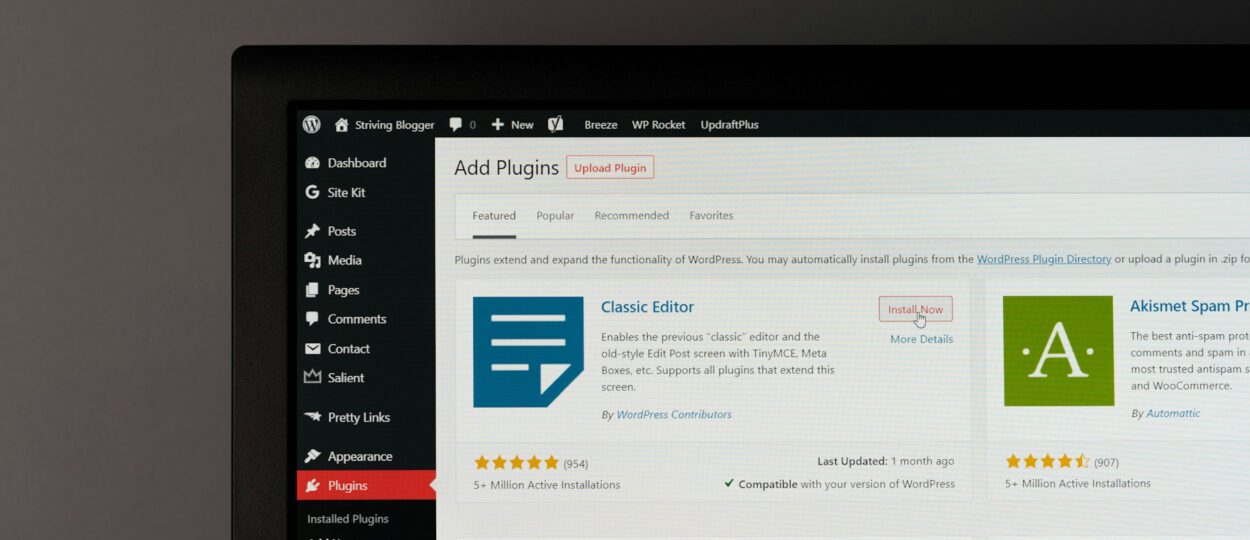
Plugins can be installed directly from the WordPress administration dashboard or uploaded manually as ZIP files.
Where to Find WordPress Plugins
The safest starting point for finding free WordPress plugins is the official WordPress Plugin Directory.
It provides access to thousands of plugins developed by individuals, development teams, and companies.
You can browse available plugins by category, search for specific functionality, and review information about each plugin before installation.
Professional WordPress Website Repair Services to Restore Performance and Security
Premium plugins are also available through independent developers and commercial marketplaces. These products often include additional features, dedicated support, and extended documentation.
Before purchasing a premium plugin, make sure you understand its licensing terms, renewal costs, update policy, and support conditions.
7 Important Things to Consider Before Installing a Plugin
Choosing a plugin should involve more than looking at its description or screenshots. Here are seven important factors to evaluate.
1. Plugin Compatibility
Always check whether a plugin supports your current WordPress version.
Compatibility issues may cause unexpected errors, broken website layouts, or conflicts with other installed plugins.
Also consider compatibility with your PHP version, active theme, and other essential extensions.
2. Last Updated Date
Regular updates indicate that developers are maintaining their software.
An outdated plugin may contain unresolved bugs, security vulnerabilities, or compatibility problems.
Although an old update date does not automatically mean a plugin is unsafe, it is worth investigating before installing it on a production website.
3. Active Installations
The number of active installations can provide an indication of a plugin’s popularity.
A widely used plugin may have a larger community, more user feedback, and more available tutorials.
However, popularity alone does not guarantee quality. A smaller plugin can still be an excellent choice if it is actively maintained and developed by a reliable team.
4. User Ratings and Reviews
Read user reviews before installing a plugin.
Pay attention to recurring complaints, especially those related to:
- Compatibility issues.
- Poor customer support.
- Unexpected website errors.
- Performance degradation.
- Missing features.
- Difficult configuration.
Look for recent reviews rather than relying entirely on historical ratings.
5. Security and Developer Reputation
Security should always be considered when selecting WordPress plugins.
Check the developer’s reputation, update history, support activity, and available security information.
Avoid downloading plugins from unknown websites or unofficial sources, especially when they offer modified premium plugins for free.
Unauthorized plugin copies may contain malicious code or hidden backdoors.
6. Performance Impact
Not every plugin is optimized for performance.
Some plugins load additional JavaScript, CSS, database queries, or external resources across the entire website, even when their functionality is only needed on specific pages.
For performance-sensitive websites, consider testing loading times before and after installing a plugin.
Use tools such as Google PageSpeed Insights and browser developer tools to identify potential performance problems.
7. Documentation and Support
Good documentation makes plugin configuration and troubleshooting much easier.
Before choosing a premium plugin, check whether the developer provides installation instructions, configuration guides, FAQs, and technical support.
This becomes particularly important for plugins handling payments, customer information, bookings, or other business-critical operations.
Essential WordPress Plugin Categories
Different websites have different requirements. However, several plugin categories are useful for many WordPress projects.
SEO Plugins
SEO plugins help website owners manage search engine optimization settings.
Common features include:
- SEO titles and meta descriptions.
- XML sitemaps.
- Canonical URLs.
- Schema markup.
- Social sharing metadata.
- Robots meta settings.
Popular examples include Yoast SEO, Rank Math, and All in One SEO.
Themes, Plugins, Customization, and Everything You Need to Build a Better Website
Security Plugins
Security plugins help protect WordPress websites against common threats.
Depending on the solution, features may include firewall protection, malware scanning, login security, and suspicious activity monitoring.
Popular examples include Wordfence Security and Solid Security.
Caching and Performance Plugins
Caching plugins improve website performance by reducing repeated processing and optimizing content delivery.
Some solutions also provide CSS and JavaScript optimization, browser caching, and image-related performance features.
Popular examples include WP Rocket, W3 Total Cache, and LiteSpeed Cache.
Backup Plugins
Regular backups are essential for website recovery.
Backup plugins can help save website files and databases to local storage or external cloud services.
Popular examples include UpdraftPlus and BackWPup.
Contact Form Plugins
Contact forms allow visitors to communicate with website owners without exposing email addresses directly.
They are commonly used for business inquiries, customer support, quotation requests, and general communication.
Popular examples include Contact Form 7, WPForms, and Gravity Forms.
E-commerce Plugins
For businesses selling products online, e-commerce plugins provide the foundation for managing an online store.
They can introduce product catalogs, shopping carts, checkout pages, payment integrations, and order management.
WooCommerce is one of the most widely used e-commerce solutions for WordPress.
How Too Many Plugins Can Affect Your Website
Installing too many plugins is not necessarily a problem by itself. The real issue is the quality, functionality, and implementation of each plugin.
A website with 30 lightweight and well-maintained plugins may perform better than a website with only five poorly optimized plugins.
Nevertheless, unnecessary plugins can introduce several problems:
Slower Loading Times
Plugins may load additional scripts, stylesheets, and external resources, increasing page loading times.
Plugin Conflicts
Two plugins may attempt to modify the same functionality, resulting in unexpected behavior or PHP errors.
Security Risks
Every additional plugin introduces code that must be maintained and secured.
NawaWP – Simulasi Kredit Kendaraan, Plugin WordPress untuk Hitung Kredit Lebih Mudah
Database Overhead
Some plugins create additional database tables, store excessive information, or execute frequent database queries.
Maintenance Complexity
Managing updates, compatibility, licenses, and support becomes more complicated as the number of installed plugins increases.
The best strategy is to install only the plugins that provide genuine value to your website.
Best Practices for Managing WordPress Plugins
Proper plugin management helps maintain website stability and security.
Consider following these practices:
- Install plugins only from trusted developers and sources.
- Keep all plugins updated.
- Remove plugins that are no longer needed.
- Back up your website before major updates.
- Test important changes on a staging environment.
- Monitor website performance after installing new plugins.
- Avoid installing multiple plugins that perform exactly the same function.
- Review plugin permissions and external service connections.
For business websites, it is also recommended to establish a regular maintenance schedule.
Should You Use Free or Premium WordPress Plugins?
Both free and premium plugins can be useful, depending on your requirements.
Free plugins are suitable for users who need basic functionality without additional costs. Many free plugins are professionally developed and receive regular updates.
Premium plugins are worth considering when you need advanced features, dedicated support, commercial licensing, or specialized integrations.
Before making a purchase, compare the available features and determine whether the additional functionality justifies the cost.
A premium plugin is not automatically better than a free alternative.
Final Thoughts
WordPress plugins make it possible to transform a basic website into a powerful digital platform. From SEO and security to e-commerce and performance optimization, plugins provide flexible solutions for different website requirements.
However, choosing the right plugins requires careful evaluation. Compatibility, security, developer reputation, performance, and ongoing maintenance should all be considered before installation.
Rather than installing every plugin that looks useful, focus on building a lightweight and reliable WordPress environment with tools that genuinely support your website’s objectives.
At Kura.web.id, we explore WordPress plugins, themes, tutorials, development techniques, and practical solutions to help website owners and developers build better websites.